Introducation
Every growing website eventually reaches a point where its infrastructure becomes the bottleneck. Performance fluctuates, traffic spikes slow things down, and scaling becomes increasingly complex.
This is where the difference between Cloud Hosting and VPS Hosting becomes critical. While both are designed to deliver strong performance, greater control, and scalable resources, they rely on fundamentally different infrastructures.
Cloud hosting relies on distributed servers, whereas VPS hosting runs on a single physical machine divided into virtual environments. This difference directly impacts scalability, control, and cost structure.
Projects with unpredictable traffic or rapid growth often lean toward cloud hosting for its scalability, while those who prioritize stable performance, full control, and predictable billing typically prefer VPS hosting.
And if you’re searching for thebest VPS web hosting experience built around dedicated resources and transparent pricing, Thamara’s VPS plans are designed to offer that balance.
In this cloud vs VPS hosting comparison, we break down the key differences so you can determine which model fits your project best.
What is Cloud Hosting?
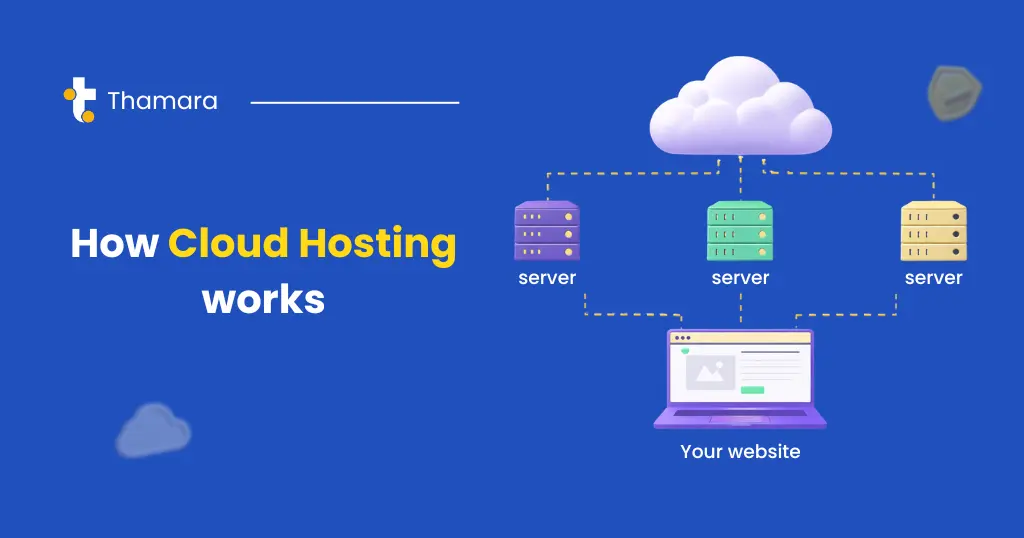
Cloud hosting is a web hosting model where your website is powered by a network of virtual servers rather than a single physical server. Instead of being limited to the resources of one machine, your site can draw computing power, memory, and storage from multiple servers working together. This creates a hosting environment that is dynamic, resilient, and designed to adapt to changing demands.
In essence, cloud hosting shifts your website from a fixed infrastructure to a flexible ecosystem built for stability and continuous availability.
What is VPS Hosting?
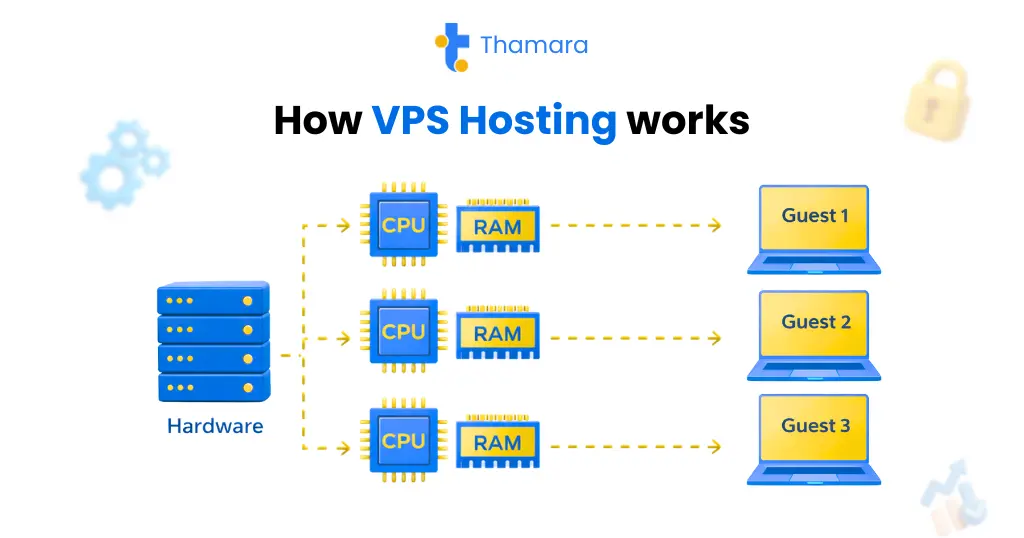
VPS (Virtual Private Server) hosting is a hosting solution where a single physical server is divided into multiple virtual servers through virtualization technology. Each virtual server operates independently, with its own operating system and dedicated resources such as CPU, RAM, and storage. This structure provides a private environment where users can configure settings, install applications, and manage their server according to their needs.
VPS hosting is commonly used by websites and applications that require reliable resources and a higher level of control.
To decide which option suits your needs best, it helps to look closely at the key differences between Cloud Hosting and VPS Hosting.
What is the Difference Between Cloud Hosting and VPS Hosting?
In this cloud vs VPS hosting comparison, we break down performance, scalability, pricing, flexibility, and real-world use cases to help you make an informed decision.
| Feature | Cloud Hosting | VPS Hosting |
| Performance | Run on multiple interconnected servers. This setup can improve availability and help distribute traffic during spikes. Actual performance depends on infrastructure quality, resource allocation, and provider configuration. | Run on a single physical server that is divided into independent virtual environments. Performance is usually stable and predictable, particularly when the provider manages server resources efficiently and avoids overloading the machine. |
| Scalability | Resources like CPU, RAM, and storage can be scaled up or down quickly, making it flexible for websites with varying traffic. Scaling depends on the provider and plan. | Scaling is limited to the capacity of the physical server. Upgrading typically involves moving to a larger VPS plan, which may require planning or brief downtime. |
| Pricing | Many cloud providers offer usage-based pricing, where you pay for consumed resources. Some providers also offer fixed cloud plans. Costs can scale with usage. | VPS hosting is generally more affordable. Most plans come with fixed monthly pricing based on allocated resources. |
| Flexibility | Offers high flexibility with dynamic resource adjustments. Cloud environments typically support easy integration with additional services, APIs, and third-party tools. | offers strong control over the virtual server, including root access and custom software installation. Flexibility is high within the limits of the physical server. |
| Reliability | Very reliable thanks to multiple servers, backups, and automatic failover systems. If one server fails, others continue running your site. | Depends on the underlying physical server. Uptime can be strong if well managed, but hardware issues may affect hosted environments unless redundancy is implemented |
| Security | Offers enterprise-grade security features such as firewalls, encryption, DDoS protection, and monitoring. Overall security depends on configuration and provider standards. | VPS is isolated from other users on the same server, offering good security. Additional measures may be needed depending on your setup. |
Beyond the technical structure, each hosting type comes with its own strengths and trade-offs in real-world use. To better understand the practical cloud hosting benefits and VPS hosting benefits, let’s break them down.
Pros and Cons of Cloud Hosting
Pros
- Instant scalability – Resources can be adjusted quickly as traffic changes.
- High availability – Workloads are distributed across multiple servers, which helps reduce downtime risks.
- Resilience – If one server experiences issues, others can help maintain continuity.
- Flexible resource usage – Many cloud plans allow you to scale up or down based on your needs.
- Backup & recovery options – Cloud environments often include built-in backup and disaster recovery features.
- Access to modern integrations – Cloud platforms frequently connect easily with APIs, automation tools, and advanced services.
Cons
- Cost variability – Usage-based billing may result in fluctuating monthly costs.
- Provider dependency – Performance and uptime depend heavily on the provider’s infrastructure.
- Learning curve – Managing and optimizing cloud resources may require some technical familiarity.
- Migration complexity – Moving between cloud providers can require planning and technical adjustments.
- Internet reliance – Stable connectivity is important for smooth operation.
Pros and Cons of VPS Hosting
Pros
- Dedicated resources – CPU, RAM, and storage are allocated specifically to your VPS.
- Strong control – Root or administrator access allows full customization.
- Predictable pricing – Fixed monthly plans make budgeting easier.
- Isolated environment – Your VPS runs independently from other users.
- Balanced performance – Offers more power and flexibility than basic shared hosting at a reasonable cost.
- Flexible configuration – You can choose your operating system and configure the server to match your needs.
Cons
- Scaling limitations – Resources are limited to the capacity of the physical server.
- Hardware dependency – Physical server issues can affect your VPS.
- Technical responsibility – Server management may require system administration skills (unless the plan is managed).
- Manual optimization – Performance tuning and security configuration are often your responsibility.
- Upgrade planning – Significant scaling may require migration to a larger plan.
Pricing Breakdown: Cloud Hosting vs VPS
When comparing cloud hosting and VPS hosting, pricing structures differ not only in cost, but in how those costs are calculated and managed over time.
Cloud Hosting Pricing Structure
Cloud hosting typically follows a usage-based or resource-based pricing model. Instead of paying for a fixed server, you pay for the computing resources you consume — such as CPU, RAM, storage, and bandwidth.
In the current market, cloud hosting prices usually start around $7 per month for basic cloud plans and can extend beyond $100 per month for plans with higher performance, more resources, and advanced features (such as autoscaling, managed services, and multi-region deployment).
This model can be beneficial when:
- Resource usage fluctuates
- Traffic increases seasonally
- Infrastructure needs scale dynamically
However, costs may vary from month to month depending on actual usage. In high-consumption scenarios, expenses can increase accordingly. Some providers also offer fixed cloud plans, but usage-based pricing remains common in cloud environments.
VPS Hosting Pricing Structure
VPS hosting generally operates on a fixed monthly pricing model. You select a plan with a defined allocation of CPU, RAM, storage, and bandwidth, and you pay the same amount each billing cycle regardless of actual usage.
For businesses comparing the VPS hosting best price options with a focus on predictability and transparent billing, Thamara’s plans start from $5.99 per month, offering dedicated resources and clear monthly pricing.
This structure is often preferred when:
- Traffic is predictable
- Budget planning requires stability
- Resource needs are consistent
While VPS plans are usually more predictable in cost, upgrading typically requires moving to a higher-tier plan rather than scaling automatically.
Support and Management: Which One Is Easier?
Managing a hosting environment involves updates, monitoring, security patches, backups, and performance optimization. The level of responsibility varies depending on whether you choose cloud hosting or VPS hosting.
Cloud Hosting
- Often comes with optional managed services that handle infrastructure maintenance, monitoring, redundancy, and failover.
- Many cloud platforms include built-in automation for scaling, backups, and system updates.
- Reduces the amount of manual server administration required, especially for teams without dedicated system administrators.
VPS Hosting
- Typically provides full root or administrator access.
- In unmanaged plans, you are responsible for system updates, security hardening, and configuration.
- Managed VPS options are available, but they may come at an additional cost.
AtThamara cloud we’ve addressed the challenges typically associated with VPS hosting. With 24/7 support and managed plans, you don’t need to worry about updates, security patches, or backups. Our team ensures your VPS runs smoothly, and if you need to scale or adjust resources, we’re always here to help.
Flexibility and Customization: Which Option Offers More Control?
Flexibility refers to how easily you can scale resources, while customization relates to how deeply you can configure the environment.
Cloud Hosting
- Designed for flexible resource allocation, allowing scaling based on workload demands.
- May offer pre-configured environments or platform-based management interfaces.
- Direct OS-level control depends on the provider and plan structure.
VPS Hosting
- Provides dedicated virtual resources with full operating system access in most cases.
- Allows installation of custom software stacks, services, and configurations.
- Suitable for projects that require specific server-level adjustments or advanced configuration.
While VPS hosting offers more control and customization, Thamara’s VPS hosting enhances this experience by providing full root access, easy automation through API & CLI access, and 24/7 expert support to help you manage and customize your server without the hassle.
Performance Considerations (Speed, Load Time)
Performance depends not only on hosting type, but also on hardware quality, storage type, server location, caching configuration, and overall optimization.
Cloud Hosting
- Uses distributed infrastructure that can help balance workloads during traffic growth.
- Often maintains stable uptime through redundancy and failover mechanisms.
- Load times may remain consistent under fluctuating demand due to elastic resource allocation.
- May integrate easily with CDN services and multi-region deployment strategies.
VPS Hosting
- Delivers stable performance within allocated CPU, RAM, and storage limits.
- Can achieve excellent load times when properly configured and optimized.
- Uptime reliability depends on the stability of the underlying physical server and provider infrastructure.
- Performance can be affected if resource limits are exceeded without upgrading.
At Thamara VPS, we ensure optimal performance by utilizing high-performance CPUs, NVMe SSD storage, and a redundant network for fast and stable connectivity. Our load balancer automatically distributes bandwidth, ensuring your applications can scale seamlessly during traffic spikes. We provide ample bandwidth to accommodate high-traffic periods, ensuring smooth and uninterrupted service.
After reviewing pricing, management, flexibility, and performance, the difference between cloud hosting and VPS becomes clearer. The right choice ultimately depends on how your project is structured and how you expect it to grow.
When to Choose Cloud vs VPS?
Choose Cloud Hosting when:
- Traffic patterns are unpredictable or growing. Cloud environments allow resources to expand and contract as needed without manual intervention.
- High availability is important. Because cloud hosting uses distributed servers, it reduces the impact of a single point of failure.
- Flexible resource usage matters. Cloud setups often allow you to adjust CPU, RAM, and storage dynamically.
- You prefer less manual server management. Some cloud platforms automate tasks like backups and failover.
Good fit for: Projects with variable traffic, applications needing high uptime, or teams that want automatic scaling.
Choose VPS Hosting when:
- Traffic is stable and predictable. VPS delivers consistent performance for steady workloads.
- You want full server control. VPS provides root or administrator access and allows you to install custom software.
- Predictable pricing matters. VPS plans commonly come with a fixed monthly fee.
- You’re comfortable with server management. Self-managed VPS requires some technical familiarity, while managed VPS is also available as an option.
Good fit for: Developers, small to medium sites with stable traffic, or businesses that want predictable bills.
Practical Use Cases and Real-World Examples: Cloud vs VPS Hosting
When Cloud Hosting Makes More Sense
Projects with Variable or Growing Traffic
Websites that experience traffic spikes, whether seasonal, campaign-driven, or unpredictable, benefit from cloud hosting because resources can scale without major restructuring.
Examples: Online stores during Black Friday, event ticketing platforms, product launch campaigns.
Applications Requiring High Availability
For projects where downtime directly affects revenue or user experience, distributed cloud infrastructure helps reduce single points of failure.
Examples: Subscription platforms, booking systems, payment gateways.
SaaS Platforms and Multi-User Applications
Platforms serving multiple users simultaneously often rely on cloud environments to distribute workloads more efficiently.
Examples: CRM systems, project management tools, learning management systems (LMS).
Multi-Region or Global Projects
A geographically diverse audience may require infrastructure deployment closer to users, which cloud hosting typically supports.
Examples: International eCommerce brands, global content platforms, multilingual websites.
Rapidly Scaling Startups
Fast-growing projects often choose cloud hosting to accommodate expansion without repeated migrations or hardware limitations.
Examples: Early-stage SaaS products, tech startups gaining rapid user adoption.
When VPS Hosting May Be More Suitable
Stable-Traffic Business Websites
Websites with predictable and consistent traffic can run efficiently on VPS without requiring dynamic scaling.
Examples: Law firm websites, corporate company sites, service-based businesses.
Projects Requiring Full Server Control
VPS hosting is well suited for environments that demand root access, custom configurations, or specific software stacks.
Examples: Custom Laravel or Node.js applications, specialized backend systems.
Hosting Multiple Client Websites
Agencies and webmasters managing several projects can use VPS to allocate dedicated resources while maintaining isolation between sites.
Examples: Digital agencies hosting 10–20 client WordPress sites.
Development and Testing Environments
A VPS provides a controlled environment for staging and testing without affecting production systems.
Examples: CI/CD pipelines, staging servers, QA environments.
Dedicated Database or Backend Services
Applications that depend heavily on database performance may benefit from the consistent resource allocation offered by VPS hosting.
Examples: Analytics dashboards, inventory management systems.
Budget-Conscious Infrastructure Planning
For projects where predictable monthly costs are a priority, VPS plans often provide clearer budgeting structures.
Examples: Small businesses with fixed IT budgets, early-stage startups managing operational costs.
Final Recommendation
There is no universal answer to the cloud vs VPS debate. The right choice depends entirely on how your project operates and how you expect it to grow.
If your workload is unpredictable, traffic changes frequently, or global scalability is a priority, cloud hosting offers the flexibility and distributed resilience needed to adapt in real time.
However, if your focus is stable performance, full server control, predictable monthly costs, and a structured infrastructure environment, VPS hosting often provides the more practical and efficient solution.
Ultimately, the decision comes down to aligning architecture with your operational needs, technical expertise, and long-term growth strategy.
If VPS hosting aligns with your requirements. Explore Thamara’s VPS plans and experience the best VPS hosting solutions built on dedicated resources and transparent pricing.
FAQs
What is the difference between VPS and cloud hosting?
VPS Hosting: In VPS hosting, a single physical server is divided into multiple virtual servers, each with dedicated resources like RAM, CPU, and storage, though they all still rely on that one physical server. This setup offers stable performance, especially for websites with predictable traffic, and gives you full control over the server to configure it as needed. It also typically comes with fixed monthly pricing, making it easier to predict costs.
Cloud Hosting: Cloud hosting, on the other hand, uses a network of multiple interconnected servers. Rather than depending on one machine, cloud hosting allows your website to pull resources from several servers, providing better scalability and reliability. If one server faces issues, others can take over, minimizing downtime. Cloud hosting excels when traffic fluctuates, offering flexible resource usage and ensuring high availability by distributing workloads across multiple servers.
Is Cloud Hosting faster than VPS?
Not necessarily.
Cloud hosting can often provide better performance for websites with changing traffic due to its scalability and ability to distribute resources across multiple servers. When one server faces high demand, others can take over, reducing downtime and improving load speeds. However, the speed also depends on factors like the provider, server configuration, and resource allocation.
VPS hosting can provide stable and predictable performance, especially if the server is well-configured and doesn’t face overload. It may have fewer resources than cloud hosting, but for websites with steady traffic, it can perform just as well, if not better, in some cases. The key to performance is not just the hosting type, but also how it’s set up and managed.
Is Cloud cheaper than VPS?
It depends on usage. In most cases, cloud hosting plans tend to be more expensive than VPS hosting.
Cloud hosting typically follows a pay-as-you-go model, where you pay for the resources you consume. This can be more cost-efficient for websites with variable traffic, but if you consistently use high resources, the cost can quickly increase. Cloud hosting can become more expensive, especially for high-traffic websites or when advanced features like autoscaling and multi-region deployment are needed.
VPS hosting, on the other hand, typically comes with fixed monthly pricing, which can make it more predictable and affordable for websites with stable traffic. For small to medium-sized projects, VPS hosting is often cheaper, as it provides dedicated resources at a consistent price. However, VPS plans may be less flexible when scaling compared to cloud hosting, which may incur extra costs if more resources are needed.
What are the disadvantages of cloud hosting?
Unpredictable Costs
Cloud hosting uses a pay-as-you-go model, so costs can change based on usage, which may lead to higher bills if traffic increases unexpectedly.
Dependency on Provider
Since cloud hosting is managed by third-party providers, you’re dependent on their infrastructure and could face disruptions if they experience downtime.
Security Risks
While cloud providers offer strong security, hosting your data on remote servers introduces risks related to privacy and potential breaches.
Limited Control
You don’t have full control over the server, and customization options may be limited depending on the provider.
Complexity
Cloud hosting can be more complicated to manage, especially for beginners who may not have technical expertise.
Internet Reliance
Your website depends on a stable internet connection, so any connectivity issues can lead to downtime.
What types of projects are best suited for Cloud Hosting and VPS Hosting?
Cloud Hosting Best for: Websites with changing or unpredictable traffic, global businesses requiring low latency and fast access across multiple regions, or startups and growing businesses that need to scale quickly without the constraints of a single server.
VPS Hosting Best for: Developers who need full control over their server environment, small to medium websites with stable, predictable traffic, or businesses that prefer dedicated resources and predictable monthly billing without needing the scalability of cloud hosting.


