

Your website is slow again? You optimized images, removed plugins, and maybe even refreshed the design. Yet the same performance issues keep coming back.
Because many times, the real problem isn’t your website; it’s your hosting.
More traffic should mean more growth. But for many websites, traffic spikes lead to slow loading, errors, or even downtime. Not because the site is badly built, but because the hosting environment can’t handle the load.
When server resources are limited, speed is the first thing to suffer. And the consequences go beyond frustration. They directly impact your business.
Every second of delay can reduce conversions, increase bounce rates, and harm your SEO rankings. For businesses running WordPress, performance isn’t just technical; it’s essential for conversions and customer retention.
This is where Thamara Web Hosting comes in. Thamara’s hosting infrastructure, including WordPress hosting for high traffic sites, is designed to keep your site fast, stable, and ready for growth, positioning it among the best hosting for high traffic sites available today.
But what makes a hosting environment truly ready for high traffic without compromising speed or stability? We’ll break this down.
Why hosting for high traffic websites Matters?
1) Performance = Better User Experience
WordPress Website performance isn’t measured in testing tools; it’s proven during traffic spikes.
Your hosting infrastructure determines how your site behaves under pressure. When resources are limited, pages slow down, requests queue, and errors appear, increasing bounce rates and turning growth into lost revenue. If load time rises from 1 to 3 seconds, bounce probability increases by 32%, and at 5 seconds, it can reach 90%. Even small delays dramatically change user behavior.
A slow server increases Time to First Byte and negatively affects Core Web Vitals, impacting both user experience and search visibility.
High-traffic environments require:
- Modern infrastructure with SSD or NVMe storage
- Adequate CPU and memory
- Sufficient PHP workers for concurrent requests
- Server-level caching
PHP workers are critical because each visitor generates dynamic requests. Without enough workers, requests stack up, Time to First Byte rises, and performance drops quickly.
For WordPress sites with dynamic content and plugins, resource availability is essential.
2) Uptime and Availability Protect Revenue
Hosting that can’t handle high traffic leads to downtime. Even a few minutes offline during peak demand can result in lost sales and damaged credibility. A reliable provider should offer at least a 99.9% uptime guarantee with continuous monitoring and fast issue response to protect both availability and revenue.
3) Scalability Protects Growth
Traffic doesn’t grow gradually. It spikes during campaigns, seasonal demand, or viral moments, especially for online stores running WordPress Woocommerce hosting, where checkout activity and concurrent users increase suddenly. This is where WordPress hosting scalability becomes critical. Scalable hosting adjusts CPU, memory, and bandwidth in real time, keeping performance stable. It should also allow easy upgrades as your site grows, without migration headaches or downtime.
4) Bandwidth and Network Capacity
High traffic doesn’t just require server power; it demands strong network capacity. Without sufficient bandwidth, data transfer slows down, causing delays and inconsistent performance.
Relying on overcrowded shared servers increases resource competition and network bottlenecks. Hosting with isolated or dedicated resources ensures smoother data flow and stable performance during peak demand.
5) Security Safeguards Stability and Trust
High-traffic WordPress sites are frequent targets for attacks, from repeated login attempts to malware injections. A secure hosting environment must include built-in firewalls, malware scanning, SSL certificates, and automatic backups to protect your data, users, and reputation.
Key Features of WordPress Hosting for High Traffic Sites
Understanding why high-traffic hosting matters is only part of the equation. The real difference lies in how the infrastructure is built.
Not every hosting environment is designed to handle sudden demand. A high-traffic WordPress setup requires multiple technical layers working together to maintain speed, stability, and security under pressure.
Below are the core features that define hosting built for scale:
1) Advanced Caching and Performance Architecture
High-traffic WordPress sites require WordPress hosting with caching to minimize unnecessary server processing.
- Server-level caching stores static versions of pages to reduce repeated requests.
- Object caching (such as Redis) lowers database load.
- Database optimization improves query handling during peak traffic.
Combined with high-speed SSD or NVMe storage, optimized web servers, and updated PHP versions, this ensures faster response times and consistent performance under heavy demand.
2) Load Balancing and Redundancy
Relying on a single server creates a single point of failure.
Load balancing distributes traffic across multiple servers to prevent overload. Redundant systems and automatic failover ensure that if one component fails, traffic is rerouted seamlessly without downtime.
This architecture protects availability during unexpected spikes or hardware issues.
3) Scalability and Auto-Scaling
Traffic spikes don’t wait for manual upgrades.
Scalable infrastructure dynamically adjusts CPU, memory, and storage based on real-time demand. Auto-scaling prevents slowdowns during campaigns, seasonal peaks, or viral exposure.
Flexible resource upgrades without downtime are essential for sustainable growth.
4) Global CDN Integration
A Content Delivery Network distributes content across global edge servers, reducing latency for users in different geographic regions.
During high-traffic events, CDN distribution reduces pressure on the origin server and stabilizes performance worldwide.
5) Modern Protocol and Stack Optimization
Performance also depends on the underlying stack.
Support for the latest stable PHP versions and modern protocols such as HTTP/3 improves processing efficiency and connection reliability, especially for mobile users.
Optimized NGINX-based environments further reduce latency and enhance request handling.
6) High Availability and Uptime Assurance
High-traffic sites cannot afford downtime.
Look for infrastructure backed by a reliable WordPress hosting uptime guarantee, real-time monitoring, and SLA-backed reliability. Automatic failover systems and proactive monitoring reduce the risk of service interruption.
Even short outages during peak demand impact revenue, SEO rankings, and brand trust.
7) Security Infrastructure
High visibility attracts attacks.
Enterprise-level WordPress hosting should include:
- Web Application Firewall (WAF)
- DDoS protection
- SSL/TLS encryption
- Malware scanning and removal
- Automated backups with fast recovery
Security protects availability, user trust, and business continuity.
8) WordPress-Specific Management
WordPress has unique performance and security requirements.
Managed WordPress hosting environments handle updates, performance tuning, and platform-specific optimizations. Access to staging environments, SSH, and performance monitoring tools simplifies management at scale.
Expert 24/7 support ensures issues are resolved quickly when traffic is high.
This combination of performance, scalability, security, and WordPress-specific optimization is what defines infrastructure built for high-traffic environments.
If you’re comparing the best WordPress hosting providers that bring all of these elements together, explore why many consider Thamara the best hosting company for WordPress and how the right foundation supports sustainable growth.
Performance Optimization Essentials for high traffic website hosting
Even the strongest hosting infrastructure requires continuous WordPress hosting speed optimization to keep sites performing under real-world traffic.
Performance isn’t optional. Slow sites lose visitors, reduce conversions, and weaken search visibility. 40% of users abandon websites that take too long to load, making speed a direct business factor.
Below are the core optimization layers that maintain performance at scale.
Layer 1: Front-End Optimization
This layer directly impacts user experience.
Image Optimization & WebP Format
Images often represent the largest portion of page weight.
Compressing images and using modern formats like WebP or AVIF significantly reduces file size without sacrificing quality. Smaller assets improve load time, reduce bandwidth usage, and support stronger Core Web Vitals performance.
Lazy Loading Implementation
Lazy loading delays off-screen images and media until users scroll to them.
Instead of loading all assets immediately, only visible content loads first. This reduces initial page weight and improves perceived speed. On content-heavy pages, lazy loading alone can reduce total load time by up to 30%.
Minification & Compression (CSS/JS)
Minifying CSS and JavaScript removes unnecessary characters and whitespace.
Combining files and enabling compression such as GZIP or Brotli reduces HTTP requests and accelerates rendering.
Third-Party Script Management
External scripts often become hidden performance bottlenecks.
Tracking pixels, chat widgets, analytics tools, ad scripts, and external fonts increase blocking time. Limiting or deferring non-essential scripts improves responsiveness during high traffic.
Critical Rendering Path Optimization
Even powerful servers can feel slow if rendering is blocked.
Deferring non-essential JavaScript, preloading priority assets, and focusing on above-the-fold content improves First Contentful Paint and Largest Contentful Paint, directly impacting Core Web Vitals and search visibility.
Layer 2: Back-End Performance Optimization
This layer ensures WordPress processes requests efficiently under load.
Plugin & Theme Optimization
Every plugin and theme adds processing overhead.
Using lightweight, well-coded themes and removing unnecessary plugins reduces database queries and improves dynamic rendering during traffic spikes.
Database Query Optimization
WordPress dynamically generates pages, resulting in multiple database queries per request.
Cleaning unused data, optimizing tables, and reducing inefficient queries improves response time and stability under heavy load.
Server-Side Caching Strategies
Caching reduces repeated server processing.
- Page caching delivers static HTML instead of rebuilding pages dynamically.
- Object caching minimizes repeated database calls.
- Browser caching stores static assets for returning visitors.
Caching can improve load speeds by 20 to 50 percent, particularly in dynamic WordPress environments.
Keeping PHP and WordPress Updated
Outdated PHP versions and WordPress core files reduce performance and increase risk.
Newer PHP versions improve execution speed and memory efficiency, while updated WordPress releases include performance and database improvements.
Layer 3: Operational Control and Stability
Optimization requires visibility and control.
Performance Monitoring & APM Tools
Optimization requires visibility.
Application Performance Monitoring tools detect slow queries, heavy processes, and resource bottlenecks before they affect users, ensuring performance remains stable as traffic grows.
CDN Configuration Tuning
Using a CDN improves delivery, but configuration determines effectiveness.
Well-configured WordPress hosting with CDN optimizes cache rules, TTL settings, and edge behavior to ensure efficient static delivery while reducing load on the origin server during traffic spikes.
Performance optimization ensures your hosting infrastructure performs efficiently under real traffic, not just handling the load but maintaining stability, so the next step is seeing how these capabilities come together within Thamara’s performance-ready infrastructure.
Thamara Hosting Advantage
Thamara’s hosting environment is built specifically for WordPress sites that require performance, security, and uptime under pressure. From advanced caching and NVMe storage to intelligent scaling and expert support, the platform is designed to handle growth without compromise.

Managed WordPress Built for Performance
Thamara’s managed WordPress plans simplify maintenance while enhancing speed. Recognized as the Hosting Company For WordPress, we integrate LiteSpeed optimization, smart WordPress caching, automatic updates, and multi-layered security to keep your site fast, secure, and fully optimized — without the technical hassle.
Automatic Scaling and Infrastructure Stability
Traffic spikes can happen at any time. Thamara’s infrastructure adapts by allocating CPU, memory, and bandwidth based on demand. This reduces the risk of slowdowns during campaigns, seasonal peaks, or viral traffic events.
24/7 Expert Support and Monitoring
High-traffic sites need immediate response when issues arise. Thamara’s WordPress hosting customer support provides continuous monitoring and expert-level assistance to minimize downtime and maintain performance consistency.
How Thamara Compares
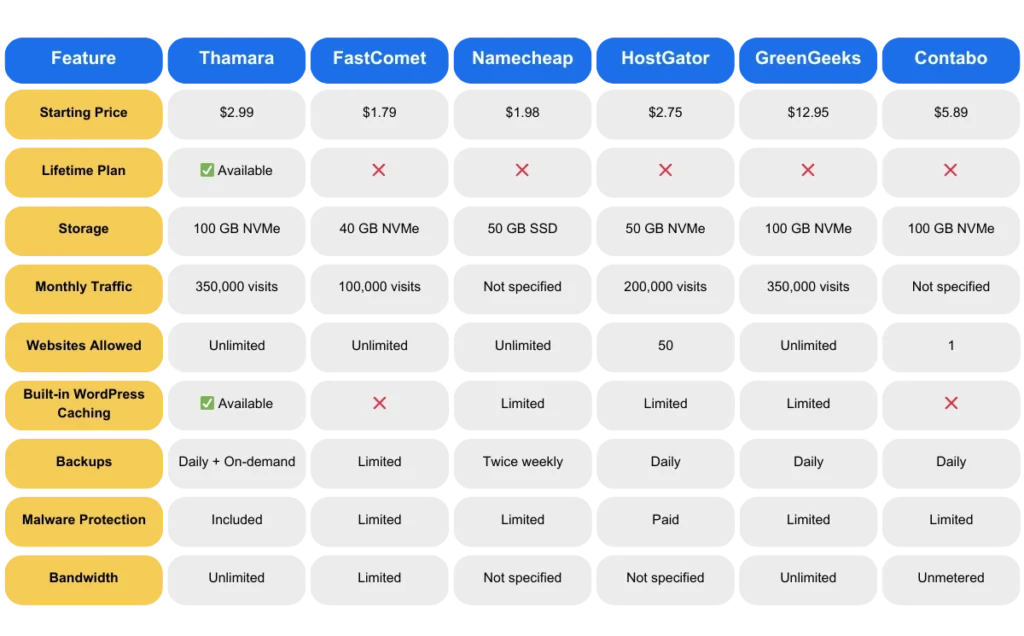
To better understand the difference, here’s a WordPress hosting price comparison side-by-side based on published feature data:
Where Thamara Differentiates
- Lifetime WordPress Hosting option for long-term cost efficiency
- NVMe-based storage across plans
- High traffic capacity (up to 350,000 visits)
- WordPress-focused acceleration tools included
- Integrated security and backup layers
- Transparent pricing without heavy add-ons
This unified ecosystem reflects Why Thamara continues to stand out in performance-driven WordPress hosting.
Best Practices for Managing High-Traffic WordPress Sites
Strong infrastructure is only the foundation. Sustained high performance depends on how well the site is managed over time.
High-traffic WordPress sites require operational discipline, not just powerful hosting.
Monitoring and Data Visibility
High traffic demands continuous visibility.
Set up real-time performance monitoring and analytics to track load times, server response, user behavior, and resource usage. Sudden spikes, slow queries, or abnormal traffic patterns should never go unnoticed.
Effective monitoring turns potential downtime into controlled response.
Traffic Spike Planning
Spikes should be anticipated, not feared.
Before campaigns, launches, or seasonal peaks, review resource usage, confirm caching behavior, and validate CDN distribution rules. Running stress tests when possible helps simulate peak demand and identify weak points before real traffic arrives.
Preparation protects reputation.
Routine Performance Reviews
Performance degrades gradually.
As plugins accumulate, content expands, and databases grow, efficiency declines. Schedule regular performance audits to remove unused plugins, clean database tables, optimize heavy pages, and refine asset delivery.
Optimization is not a one-time task. It is a recurring process.
Security Hygiene
Security is not just protection. It is maintenance.
Regularly update WordPress Hosting core, themes, and plugins. Remove unused extensions. Enforce strong authentication policies. Review firewall logs and monitor suspicious activity.
Consistent security hygiene reduces risk exposure in high-visibility environments.
Controlled Update Strategy
Updates improve performance and patch vulnerabilities, but unmanaged updates introduce instability.
Use staging environments to test changes before deployment. Apply updates during low-traffic windows. Maintain reliable backup points before any structural modification.
Stability requires controlled execution.
Content Delivery Refinement
Efficient delivery reduces strain on infrastructure.
Optimize image formats, reduce unnecessary third-party scripts, compress assets, and fine-tune cache expiration rules. Delivery efficiency ensures that increased traffic does not automatically increase server stress.
Managing all these layers manually takes time and expertise. Thamara simplifies everything through managed solutions built for performance. As one of the trusted WordPress Hosting Providers for Small Businesses, it delivers scalability, security, and stability in one environment.
Common Mistakes to Avoid
High traffic rarely causes failure on its own. Most problems come from avoidable mistakes.
Avoiding these errors helps your WordPress site stay stable as traffic grows.
Choosing Shared Hosting for High Traffic
Shared hosting may work for small sites, but it struggles under heavy demand. When multiple websites share the same server resources, traffic spikes quickly lead to slow loading and errors.
High-traffic sites need dedicated or isolated resources.
Ignoring Database Optimization
WordPress Hosting depends on its database to generate pages. Over time, unused data and inefficient queries slow everything down.
Regular cleanup and optimization keep response times consistent during traffic peaks.
Using Too Many Plugins
Every plugin adds processing load. Too many, or poorly built ones, reduce performance and increase security risks.
Keep only essential, trusted plugins and remove the rest.
Weak Backup Strategy
Without reliable backups, one failure can mean permanent data loss.
Automated backups and easy restore options are critical for high-traffic environments.
Ignoring Security
More visibility means more risk.
SSL, firewall protection, malware scanning, and regular updates are not optional. Security gaps can lead to downtime and reputation damage.
Not Monitoring Performance
Performance issues rarely appear suddenly. They build over time.
Tracking load times, traffic patterns, and server response helps you detect problems early and fix them before users are affected.
conclusion
High traffic should never be the reason your WordPress site slows down, breaks, or loses revenue. With the right infrastructure, smart optimization, and disciplined management, your site can stay fast, secure, and stable even during peak demand. Growth should feel controlled and predictable, not risky or fragile.
If you’re serious about performance, uptime, and long-term scalability, it’s time to build on a foundation designed for scale and reliability. Make the move to the Hosting Company For WordPress hosting
FAQS
Can WordPress handle high traffic?
Yes, WordPress can handle high traffic, but only if it runs on the right infrastructure. WordPress is dynamic and database-driven, which means traffic spikes increase server load. With proper caching, CDN integration, optimized databases, and scalable hosting, WordPress can support hundreds of thousands of visits per month.
Platforms like Thamara are designed specifically for WordPress hosting for high traffic sites, combining NVMe storage, caching layers, and scalable resources to maintain stability during peak demand.
Is WordPress suitable for large sites?
Absolutely. Many enterprise websites, media platforms, and high-traffic e-commerce stores use WordPress. Its flexibility, plugin ecosystem, and scalability make it suitable for complex and content-heavy environments.
The key factor is infrastructure. Large sites require managed WordPress hosting with strong uptime guarantees, caching systems, and performance monitoring. Thamara provides structured, performance-focused environments built for scale.
Which hosting is best for a WordPress website?
The best hosting depends on your traffic level, growth expectations, and performance needs. For small blogs, shared hosting may work. For growing businesses or high-traffic sites, managed WordPress hosting with caching, CDN, and scalable resources is essential.
Thamara stands out by offering optimized WordPress environments and plans, automatic scaling, integrated security layers, and performance monitoring in one unified solution.
Do professional websites use WordPress?
Yes. Over 40 percent of websites worldwide run on WordPress, including news sites, SaaS platforms, and large e-commerce stores. Professionals choose WordPress because it offers flexibility, strong SEO capabilities, and full customization control.
When paired with enterprise-grade hosting like Thamara, WordPress becomes a stable and scalable platform for serious businesses.
What is the disadvantage of WordPress?
WordPress itself is not the issue. Problems usually come from mismanagement.Common disadvantages include performance issues when overloaded with plugins, security risks if not updated, slow speed on low-quality hosting, and database bloat over time.
With proper optimization and reliable managed hosting such as Thamara’s environment, most of these challenges can be effectively controlled.


